How Proezi Organizes Visitor Routes, Payment Info, and Company Identity
Introduction
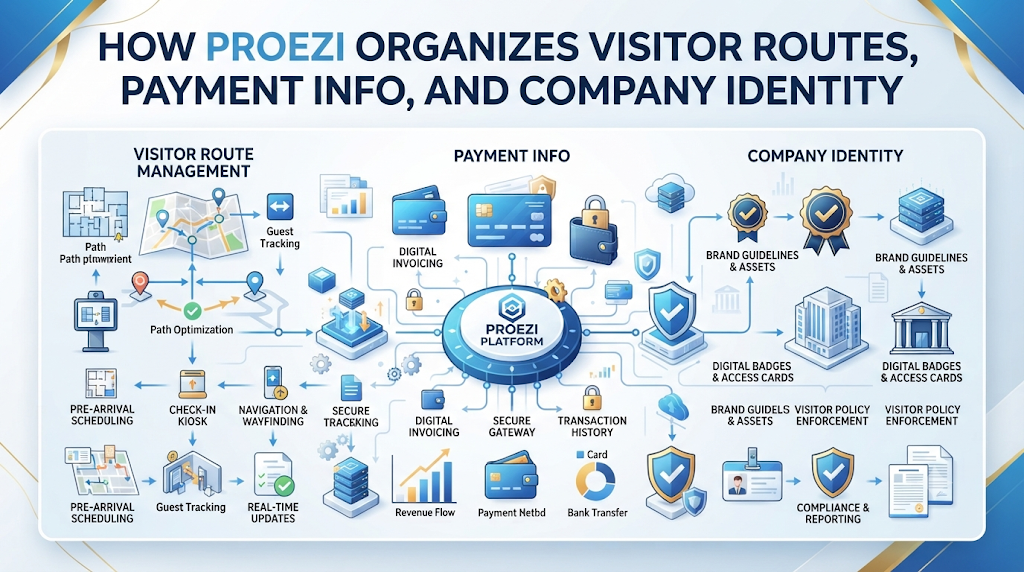
Picture a courier waiting at the wrong gate because someone gave verbal directions over the phone, while an accountant types the same bank number into chat again and a vendor asks for a registration ID lost in last week’s inbox. Everyday friction like that slows teams down and creates easy mistakes.Putting those facts on dedicated digital pages changes the rhythm of daily work. Update a detail once, and every link or printed QR code stays current. Proezi brings visitor arrival directions, payment information, and company identity records together in browser-based pages built for straightforward sharing.proezi.com
What Is Proezi?
Proezi is a web-based business information-sharing platform that helps organizations publish and maintain essential details through reusable links and QR codes. Visitors open shared pages directly in a browser without installing an app or creating an account, and the setup supports international audiences.
Three core capabilities define the platform:
- Digital visitor arrival instructions: Step-by-step guidance covering everything from outdoor routes to exact rooms.
- Business payment information pages: Dedicated pages for bank transfer details, UPI information, PayPal details, and supported international payment identifiers.
- Business identity information pages: Shareable pages displaying registered business names, company registration numbers, and tax identifiers.
Why Businesses Need Better Digital Information Sharing
Teams share routine operational details with customers, visitors, suppliers, delivery drivers, and partners constantly. Relying on scattered messages creates clear friction:
- Repetitive messaging from typing identical details across emails and chats
- Confusing location notes that leave guests unsure where to turn
- Outdated payment records that slow down billing or cause transfer errors
- Missing registration numbers during vendor setup and compliance checks
- Wrong-entrance arrivals that delay meetings and reception check-ins
- Scattered updates across multiple offices, branches, or sites
Centralized, reusable pages keep information consistent. Your staff stops hunting through old threads, and contacts see accurate details immediately.
QR Code Directions for Visitors: Making Business Locations Easier to Find
QR code directions for visitors turn physical signs and invitations into fast arrival guides. Scanning a code with a phone camera opens a dedicated arrival instruction page right in the browser.
This approach helps across many environments:
- Office buildings guiding guests, clients, and job candidates
- Clinics helping patients reach check-in desks and care rooms
- Hotels assisting arriving travelers with drop-offs and lobbies
- Event venues directing attendees and crews smoothly
- Commercial properties with shared lobbies and multiple tenants
- Warehouses clarifying delivery gates versus office entry
- Educational facilities spread across campus buildings
- Customer service centers handling daily walk-ins
Display QR codes on invitation emails, reception desks, parking signs, event tickets, and entrance boards so visitors reach the right spot with less guesswork.
Understanding Visitor Wayfinding Software
Visitor wayfinding software helps people bridge the gap between arriving near a property and reaching a specific destination inside it. Outdoor map apps route drivers to the general area, while wayfinding clarifies what happens right after arrival.
Helpful wayfinding supports step-by-step directions, entrance information, parking guidance, and floor or room details. Visual landmarks, map coordinates, accessible routes, and temporary access notices also keep visitors informed when conditions change.
Evaluate wayfinding options around your site layout, visitor volume, accessibility needs, and daily operations. Proezi focuses on digital visitor arrival instructions and last-mile guidance delivered through browser pages and QR codes.
Digital Visitor Arrival Instructions: From Road to Reception
Clear digital visitor arrival instructions break an unfamiliar arrival into distinct stages:
- Reaching the surrounding area
- Finding the correct parking area
- Identifying the correct gate
- Locating the building entrance
- Reaching reception
- Finding the correct floor
- Reaching the final room or destination
Photographs, recognizable landmarks, written steps, and map coordinates reduce uncertainty at each stage. Organizations can also publish separate routes for drivers, pedestrians, taxis, delivery staff, and visitors who need step-free access.
How to Find Us Page for Business: What Should It Include?
A practical how to find us page for business gives visitors concrete details beyond a map pin. A map pin shows a spot on a road, yet it often misses which gate opens or which elevator serves a suite.
Include these details when applicable:
- Business or venue name and general location
- Map coordinates and nearby landmarks
- Parking instructions, main entrance details, and gate information
- Reception location, floor and room details, and visitor contact info
- Accessibility instructions and temporary access notices
Reusable digital arrival pages complement traditional location pages by keeping specific entry steps organized and easy to share.
Event Venue Directions QR Code: Simplifying Event Arrivals
An event venue directions QR code gives attendees a quick way to check entry routes before and during an event. Venues often contend with multiple entrances, temporary parking arrangements, large grounds, security checks, and busy registration desks.
Organizers also coordinate different event halls, separate guest and staff entrances, and delivery or vendor access. Sharing QR codes on digital invitations, registration confirmations, tickets, posters, and venue signs helps people find the right entry point faster.
Clear directions improve the arrival experience for attendees, speakers, vendors, and staff alike.
Parking and Entrance Directions for Visitors
Treating parking and entrance directions for visitors as separate yet connected parts of an arrival plan avoids common mix-ups. Someone can find parking easily and still walk toward the wrong entrance.
Cover visitor parking locations, reserved bays, parking restrictions, and accessible parking details clearly. Pair those notes with pedestrian routes, main and secondary entrances, security gates, reception locations, and building access instructions.
Update the instructions promptly whenever parking arrangements, gates, or entry rules shift.
Last Mile Navigation for Businesses: Solving the Final-Destination Problem
Last mile navigation for businesses addresses the final stretch after a visitor reaches the right street or building. Arriving at the address does not always mean reaching the intended destination.
Common examples include:
- Offices inside large commercial complexes with shared lobbies or multiple blocks
- Clinics within multi-building campuses with separate wings
- Event halls with separate entrances for different groups
- Warehouses with designated delivery gates away from main offices
- Hotels with multiple access points or garage levels
- Businesses located on upper floors requiring specific lifts
Visitors can open outdoor navigation apps like Google Maps, Apple Maps, or Waze for the drive over, then follow on-site instructions—including cached offline directions when available—to reach the final door.
How QR Codes Make Visitor Communication More Practical
QR codes make sharing arrival details straightforward across physical and digital channels. Place them on printed signs, reception boards, event invitations, confirmation messages, websites, parking areas, delivery instructions, and visitor welcome materials.
Because a QR code links to a reusable page, teams can update instructions without repeatedly reprinting signs or resending details, provided someone keeps the page current.
How to Share Bank Details with Customers Securely
When you share bank details with customers, accurate formatting helps prevent billing mix-ups. Customers and suppliers may look for the registered account holder name, bank name, account number, IFSC or local bank code, SWIFT or BIC details where applicable, payment purpose, reference information, and supported international payment identifiers.
Double-check account details before publishing, and use appropriate access controls rather than exposing sensitive information carelessly. Proezi shares payment instructions and copyable details—it does not process, collect, or transfer payments. Customers complete transactions directly through their own banking or payment applications.
UPI QR Code Payment Page: Making Payment Instructions Easier to Access
A UPI QR code payment page brings together UPI payment identifiers, QR code access, payment-purpose references, copyable payment information, and printed payment signs where helpful.
Customers complete payments using their own supported banking or payment applications. Sharing payment information differs from processing a payment, and opening a payment page does not confirm a successful transaction. Check payment confirmation directly through your banking or payment app records.
Share Business Registration Details Online
Organizations frequently share business registration details online so clients, vendors, and partners can view standard company records. Typical items include the registered business name, company registration number, tax identification number, and related business identifiers.
Review details before publishing and avoid exposing information that should remain private. Format or checksum validation checks identifier structure—it does not independently verify government registration status or ownership.
Why Businesses Need Separate Visitor, Payment, and Identity Pages
Keeping visitor directions, payment details, and business identity on separate pages prevents clutter. Each reader finds what matters for their task without sifting through unrelated notes.
| Page Type | Main Purpose | Typical Information | Intended Audience |
| Visitor directions page | Help people reach a location | Parking, entrances, gates, reception, floors | Visitors and delivery partners |
| Payment details page | Share payment instructions | Bank details, UPI information, payment references | Customers and suppliers |
| Business identity page | Share company information | Registered name, registration numbers, tax identifiers | Customers and business partners |
Separate pages make information easier to scan, share, and update over time.
How Proezi Helps Offices, Clinics, Hotels, and Event Venues
Different organizations face varied arrival and sharing needs, yet clear instructions help across the board:
- Offices: Guide interview candidates, employees, clients, and visitors to the right building entrance and reception desk.
- Clinics: Share parking, accessible entrance, reception, and department directions clearly with patients.
- Hotels and hospitality businesses: Give guests clear arrival and access instructions before they arrive.
- Event venues: Help attendees, vendors, speakers, and staff find the right gates, halls, and desks.
- Warehouses and logistics facilities: Provide delivery gate and vehicle access details so drivers reach the right spot.
How to Create Better Digital Arrival Instructions
Use this ten-step sequence to prepare clear visitor directions:
- Identify the visitor’s starting point
- Define the correct destination
- Mark parking locations
- Identify entrances and gates
- Add recognizable landmarks
- Explain the route to reception
- Include floor and room information
- Add accessibility guidance
- Include relevant contact information
- Review the instructions from a visitor’s perspective
Test your instructions before distributing them so unclear steps or missing details get fixed early.
Multilingual and Accessible Visitor Directions
Arrival instructions work best when they account for different languages, mobility needs, and familiarity with the site. Simple language, clear photographs, and recognizable landmarks help visitors navigate smoothly.
Provide step-free routes, accessible parking, elevator directions, alternative entrances, and mobile-friendly instructions to support international visitors and anyone who needs accessible entry options.
How to Keep Shared Business Information Accurate
Reusable pages need ongoing attention as operations shift. Changes often involve new parking arrangements, relocated entrances, changed reception areas, updated bank account details, revised registration information, temporary building restrictions, or new contact details.
Assign clear responsibility for reviewing pages and updating them whenever details change. Also keep in mind that QR codes and digital pages do not automatically prevent fraud, so careful review remains important.
A Practical Digital Information-Sharing Checklist for Businesses
Use this checklist to set up and maintain organized information pages:
- Identify the information customers need
- Create separate visitor, payment, and identity pages
- Check the accuracy of all details
- Prepare clear arrival instructions
- Add useful landmarks and photographs
- Review parking and entrance information
- Generate and test QR codes
- Check payment information carefully
- Review business registration details
- Consider accessibility and language needs
- Display QR codes in suitable locations
- Update information when details change
Following a steady checklist keeps everyday business information organized and reliable.
Why Proezi Is Worth Exploring
Proezi combines digital visitor arrival instructions, reusable QR codes, business payment information pages, and business identity pages in one browser-based platform. Visitors, customers, suppliers, and partners access shared details directly in their browser without installing an app or creating an account.
For teams looking to organize essential business information through reusable links and QR codes, Proezi provides a practical option to explore.
Share anything with ease.
FREQUENTLY ASKED QUESTIONS
What are QR code directions for visitors?
QR code directions for visitors are scannable codes that open a digital arrival instruction page in a visitor’s browser. Scanning the code lets visitors view step-by-step arrival details right away without digging through old messages.
What is visitor wayfinding software?
Visitor wayfinding software helps people navigate from a nearby road or parking spot to a specific entrance, floor, or room. It organizes practical details such as routes, landmarks, parking, and access notes.
How do digital visitor arrival instructions work?
Digital visitor arrival instructions guide people stage by stage from the surrounding area to their final destination. They can combine text, photos, map coordinates, landmarks, and separate routes for different visitors.
What should a business include on its how to find us page?
A how to find us page should cover the business name, general location, map coordinates, landmarks, parking, gates, entrances, reception, floor or room details, contact info, accessibility notes, and temporary changes.
How can event venues use QR codes for directions?
Event venues can place QR codes on tickets, invitations, confirmations, posters, and signs to guide attendees, speakers, staff, and vendors. Visitors can check entrances, parking, halls, and desks on their phones.
How can businesses share parking and entrance directions?
Businesses can publish clear notes on visitor and accessible parking alongside pedestrian paths, gates, entrances, and reception locations. Updating those details whenever access changes keeps arrivals smooth.
What is last mile navigation for businesses?
Last mile navigation for businesses covers the final steps after someone reaches the right street or building. It helps visitors find the exact gate, lobby, lift, or room inside larger or multi-part sites.
How can businesses share bank details with customers?
Businesses can publish account holder names, bank names, account numbers, bank codes, payment references, and international identifiers on a dedicated page. Proezi shares these details without processing or transferring payments.
What is a UPI QR code payment page?
A UPI QR code payment page shares UPI payment details, QR codes, and copyable reference information in one place. Customers pay through their own banking or payment apps, and payment success is confirmed via payment apps rather than page views.
How can businesses share registration details online?
Businesses can publish registered names, company registration numbers, and tax identifiers on a dedicated identity page. Format or checksum checks do not independently verify government registration or ownership.
FINAL THOUGHTS
Organized, reusable pages make everyday coordination simpler for everyone dealing with your business. Visitors, customers, suppliers, and partners can check current arrival steps, payment instructions, and company details without asking for the same information repeatedly.By uniting visitor directions, payment information pages, and business identity pages behind reusable links and QR codes, Proezi gives organizations a practical way to keep essential details accessible.proezi.com
Leave a Reply